Treefort Scheduling — SMS Consent Evidence
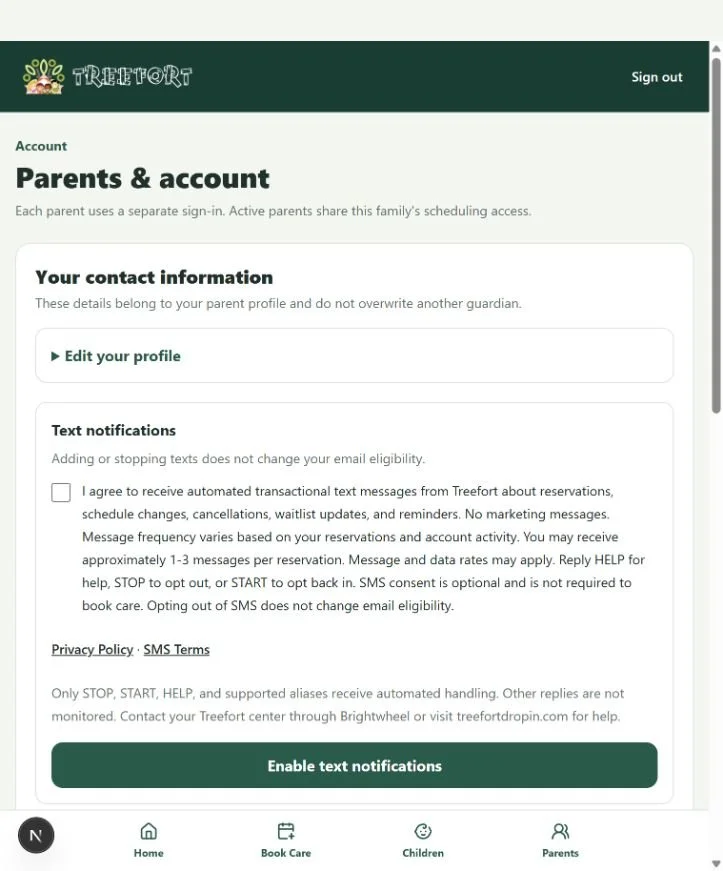
This page documents the implemented optional SMS enrollment flow for toll-free verification. The screenshot shows the application consent UI captured in the local validation environment; it is not evidence of Production SMS activation. No parent or child personal information is included.
How consent is collected
A signed-in guardian opens Parents & account → Text notifications. The SMS checkbox is unchecked by default. To enroll, the guardian checks the consent box and selects Enable text notifications. Consent is optional and not required to book care. Consent timestamp and source are recorded. Adding or stopping texts does not change email eligibility. This evidence page does not collect or submit consent.
Complete checkbox disclosure
I agree to receive automated transactional text messages from Treefort about reservations, schedule changes, cancellations, waitlist updates, and reminders. No marketing messages. Message frequency varies based on your reservations and account activity. You may receive approximately 1-3 messages per reservation. Message and data rates may apply. Reply HELP for help, STOP to opt out, or START to opt back in. SMS consent is optional and is not required to book care. Opting out of SMS does not change email eligibility.
Reply handling
Only STOP, START, HELP, and supported aliases receive automated handling. Other replies are not monitored. Contact your Treefort center through Brightwheel or visit treefortdropin.com for help. START and UNSTOP are supported restoration keywords. Provider STOP takes precedence over the website SMS preference.
Privacy Policy: https://www.treefortdropin.com/privacy-policy
SMS Terms: https://www.treefortdropin.com/sms-terms
Actual consent interface
The screenshot below shows the unchecked checkbox, full disclosure, policy links and separate Enable text notifications action. Profile details are excluded.